
A review is one pass of the BriefCatch engine over one document. It produces writing suggestions, citation-format corrections, and consistency findings, and it opens the door to RealityCheck, which is a separate, explicitly started run.
Which review features you get varies by plan and organization.
Two things people mix up
| What it is | Cost | |
|---|---|---|
| Document review | The pass described on this page: writing, clarity, proofing, and citation format | Not metered |
| RealityCheck | A separate run you start deliberately, checking whether an authority supports the proposition it is cited for | Spends credits |
Running a review never starts a RealityCheck, and never spends a credit.
From upload to results
-
Upload or pick a file
From My Documents, choose Upload document, or add one from a connected drive. The upload dialog validates the file and asks where the copy should live afterwards. See My Documents. -
Analysis runs
The editor opens and shows progress: uploading, extracting text, analyzing, extracting citations. During busy periods you may see Queued — position N. That is a real queue, not an error. -
Results arrive
Suggestions populate the sidebar as each stage completes. Citation extraction starts automatically once the writing pass is done, so the Citations tab can still be working while the others are ready. -
You work the suggestions
Accept, reject, or ignore each one. See Work with suggestions.
TIP: Do not upload the same document again because a review is still queued. A second upload is a second document and a second run — it does not jump the queue, and it leaves you two copies to reconcile.
The review editor
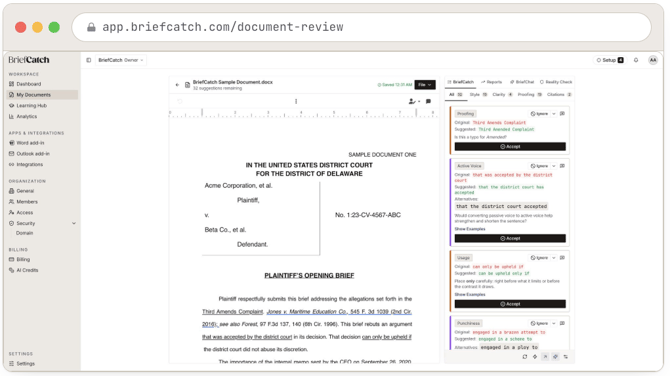
The review editor: document on the left, review sidebar on the right with its BriefCatch, Reports, BriefChat, and Reality Check tabs, and suggestion cards grouped by category underneath.
The screen has three parts:
- The header — the file name, how many suggestions remain, the save state (Saving, Saved HH, No changes, or Save failed), and a File menu with Export to Word (.docx), Export PDF, and Review history. Saving is automatic; there is no manual save button.
- The document — a real editor. You can type in it. Edits are saved back to the stored copy, and the toolbar carries the usual formatting controls, zoom, and a ruler.
- The review sidebar — tabs across the top and suggestion cards below.
The sidebar also switches between views: BriefCatch (the suggestions), Reports, BriefChat, Reality Check, and Settings.
Progress
The sidebar tracks how many suggestions are outstanding. The editor deliberately does not show a writing score: an earlier version did, and it was removed because the number was a presentation-only heuristic with nothing measured behind it.
Scores do exist, but in Reports, where they are computed per category against the document. Those are editorial signals about the writing, and say nothing about whether the argument is correct or the filing is sound.
Re-analyzing
Re-analyze document runs the engine again over the current text. Reach for it after substantial edits, when suggestions no longer line up with the passages they refer to. On an expired trial the control is replaced by Your trial has expired — upgrade to re-analyze.
Re-analysis replaces the current findings. Anything you had already accepted stays in the document; anything outstanding is recalculated.
BriefChat
BriefChat is a chat panel scoped to the document you have open, for questions the suggestion cards do not answer directly — “How do I make my legal writing more persuasive?” gets a structured answer with a takeaway, the reasoning behind it, and concrete phrasing to apply, drawn from the same editorial judgment behind your suggestions.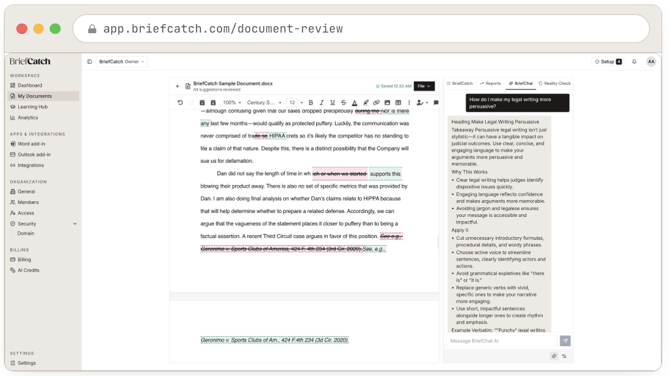
The BriefChat tab: a question in the message thread, and a structured reply with a heading, a takeaway, why it works, and how to apply it, with a message box to keep the conversation going.
BriefChat answers about writing and drafting; it does not verify a citation’s substance. For that, use RealityCheck.
Coming back later
The library keeps recent documents with their review status, suggestion progress, and expiry. Opening a reviewed document reopens the review where you left it.
Details in the library opens the document’s history — previous review runs, and version and author history where available.
If the stored document has expired, its metadata may still be listed but the document cannot be opened. Re-upload the source file to review it again.
When something goes wrong
- “Analysis service is unavailable. Please try again later.” — the engine could not be reached. The document is safe; retry the review rather than re-uploading.
- “Failed to load suggestions. Please try again.” — results exist but did not load. Refresh before re-analyzing; re-analyzing throws away findings that were only failing to display.
- Progress stops advancing — if the product offers Try again, use it once. See Troubleshooting.