
Always check your court’s local rules and the governing citation manual before finalizing a citation — BriefCatch checks form, not what your jurisdiction requires.
Citation corrections are about form: is the citation punctuated, spaced, abbreviated, and italicized the way it should be. This is a different question from whether the citation is true — whether the authority actually supports what you cited it for. That question belongs to RealityCheck, and it is worth keeping the two apart, because a citation can be perfectly formatted and still not say what your sentence claims, or perfectly accurate in substance and still wrong on the page.
What the checker looks at
A citation is built from several fields, and BriefCatch checks each one independently:
| Field | What gets checked |
|---|---|
| Case name | Correct abbreviation and italicization |
| Reporter | Correct abbreviation, spacing, and volume/page format |
| Court | Correct parenthetical court designation |
| Date | Correct year placement and format |
| Signal | Correct introductory signal (See, Cf., But see, and so on) |
| Page | Correct page reference |
| Pincites | Correct pinpoint-page format |
A card that says “No issues” means every field it checked came back clean — not that the citation was skipped.
Applying a correction
-
Open the citation suggestion
It shows the original citation, the field-level issue, and one or more proposed replacements. -
Compare against the source
Read the explanation and the proposed replacement against the actual authority and your jurisdiction’s citation manual, not just against the card. -
Choose the right replacement
Where more than one is offered, pick the one that matches the source and your governing citation rules — they are not always interchangeable. -
Accept, reject, or ignore
Accept applies it. Reject or ignore leave the existing citation in place. See Work with suggestions for what the difference between reject and ignore means going forward.
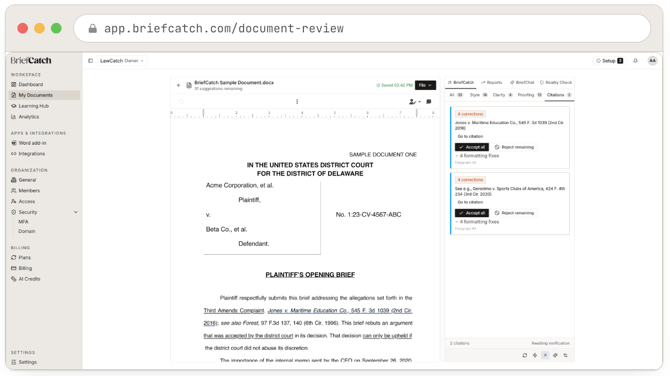
The Citations tab of the suggestions panel: two citation cards, each with a case name, a corrections count, Go to citation, Accept all and Reject remaining, and its formatting-fix count and paragraph reference.
Corrections that look invisible
Some corrections change only character-level styling — italics, spacing, a non-breaking space — so the visible text before and after can look nearly identical. That is not the correction failing to apply; inspect the actual formatting in the document (select the citation and check whether it is italicized) rather than judging by eye alone.
When a suggestion will not apply
If you have edited the surrounding text substantially since the review ran, BriefCatch may not be able to anchor the suggestion to the current passage — the text it was pointing at has moved or changed. Refresh the review before trying to apply it. See Review a document.
What this feature does not do
It does not verify that the cited case exists, that it holds what you say it holds, or that the pincite points to the right page of the actual opinion. Format-correct is not the same as substance-correct. For that, run RealityCheck — and even then, read the source before you rely on either feature’s answer in a filing.